Your fabrication shop,
controlled in real time
From the cutting sheet to the shipping waybill — one system. Cutting, assembly, painting, warehouse and returns are recorded by the people who do the work, on their phones.
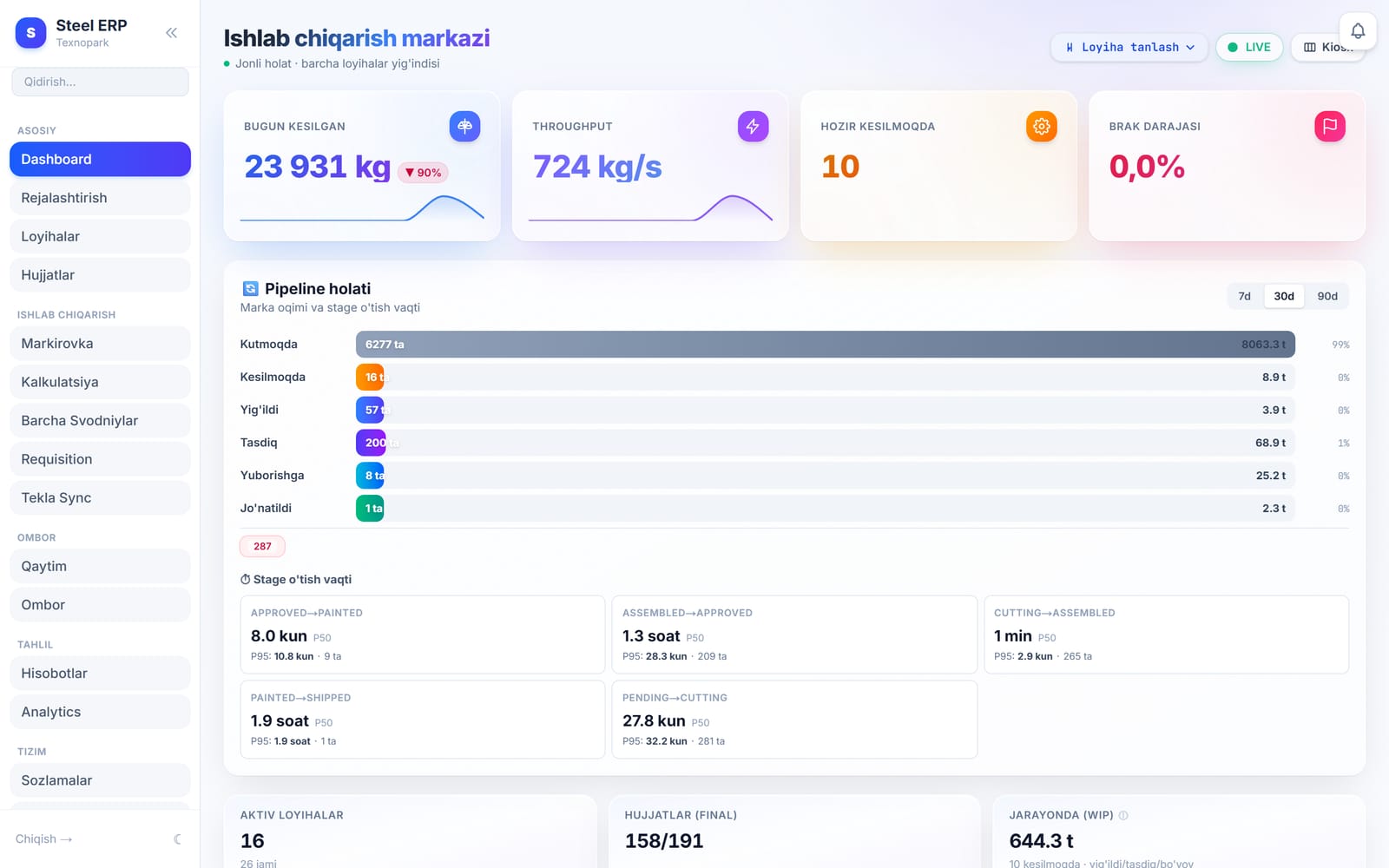
Live plant dashboard
Running in a real steel fabrication plant
In production today
Screens — what problem each tab solves
What's inside
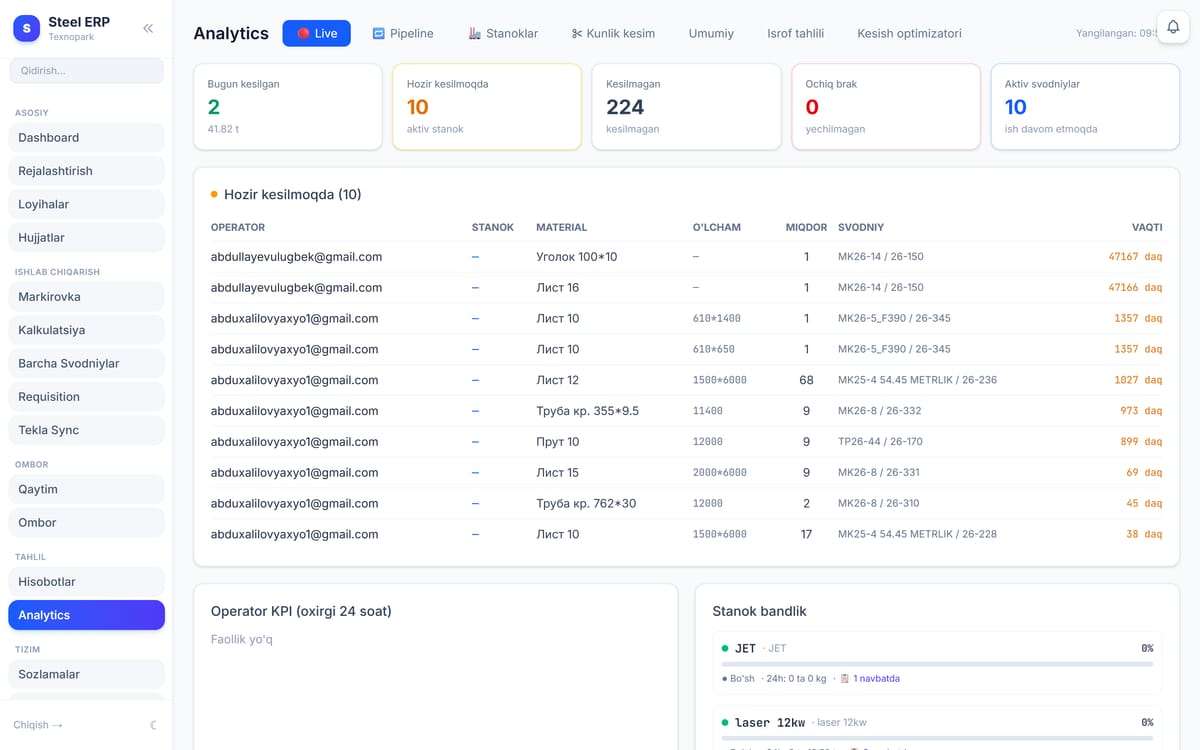
Raqamlar bilan boshqaruv
Problem: Stanoklar qancha bo‘sh turadi? Kim qancha kesdi?
- ▸Stanok bandligi, kunlik kesim, operator reytingi
- ▸Jonli holat — sahifa o‘zi yangilanadi
- ▸Excel / PDF eksport
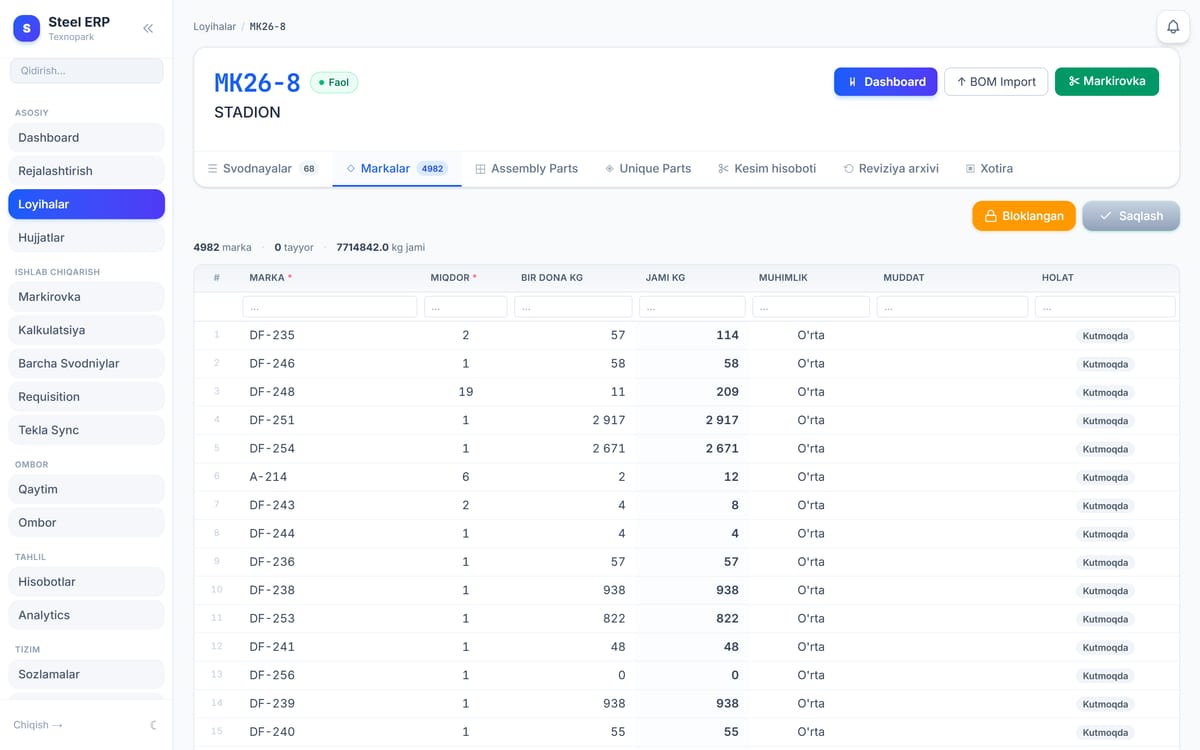
Konstruksiya BOM’i — bitta jadval
Problem: Konstruktor BOM’ni qo‘lda ko‘chiradi — xato va vaqt.
- ▸Tekla’dan avto import
- ▸Markalar + Assembly + Unique Parts
- ▸Reviziya, dublikat nazorati
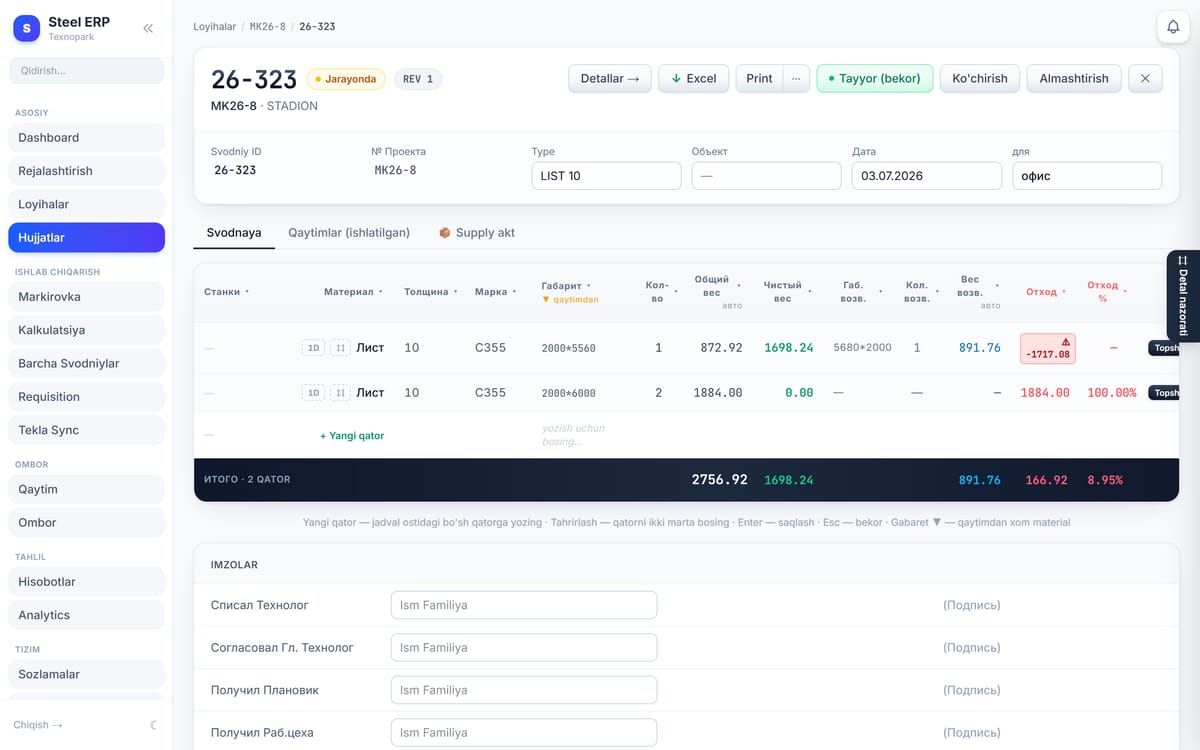
Kesim hujjati — to‘liq nazorat
Problem: Material, otxod, qaytim qog‘ozda — balans buziladi.
- ▸Brutto/netto/otxod — avto hisob
- ▸Har qatorga stanok yo‘nalishi
- ▸Balans buzilsa — qizil ogohlantirish
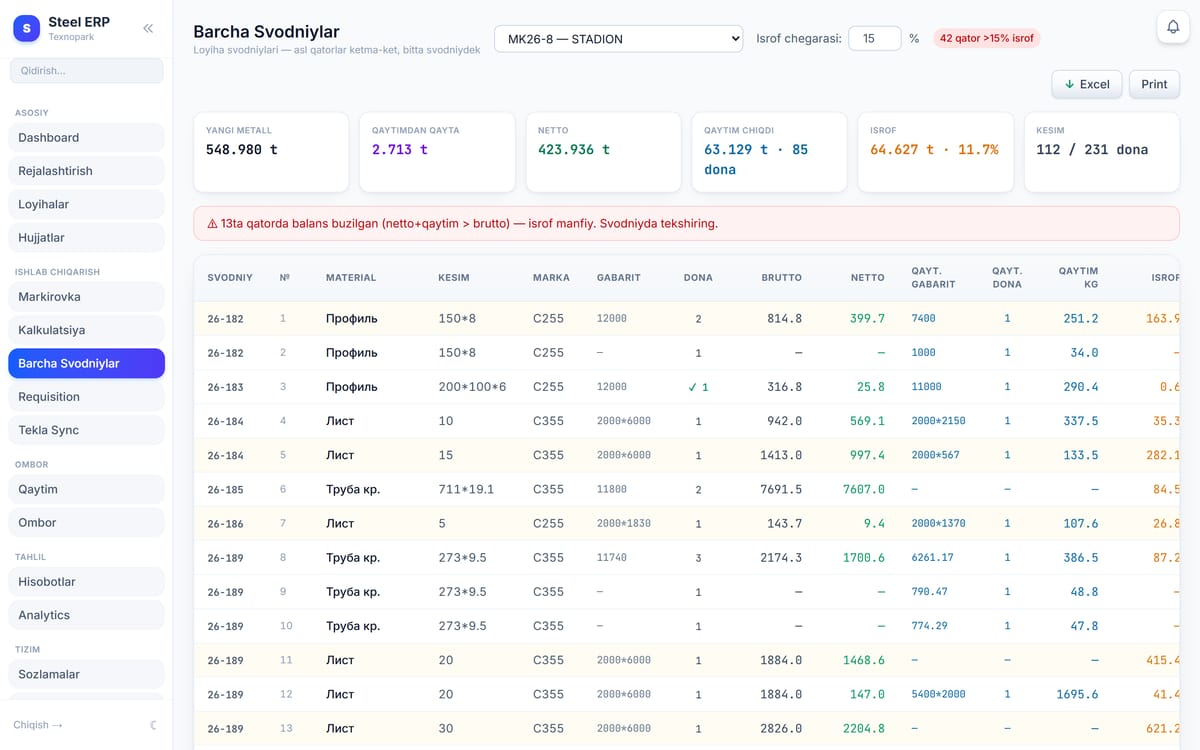
Barcha svodnaylar — bitta manzara
Problem: Bir loyihaga bir necha svodnaya — umumiy hisob yo‘q.
- ▸Yangi metall vs qaytimdan qayta
- ▸Netto, otxod %, kesim progressi
- ▸Balans buzilgan qatorlar aniqlanadi
Shop floor · mobile
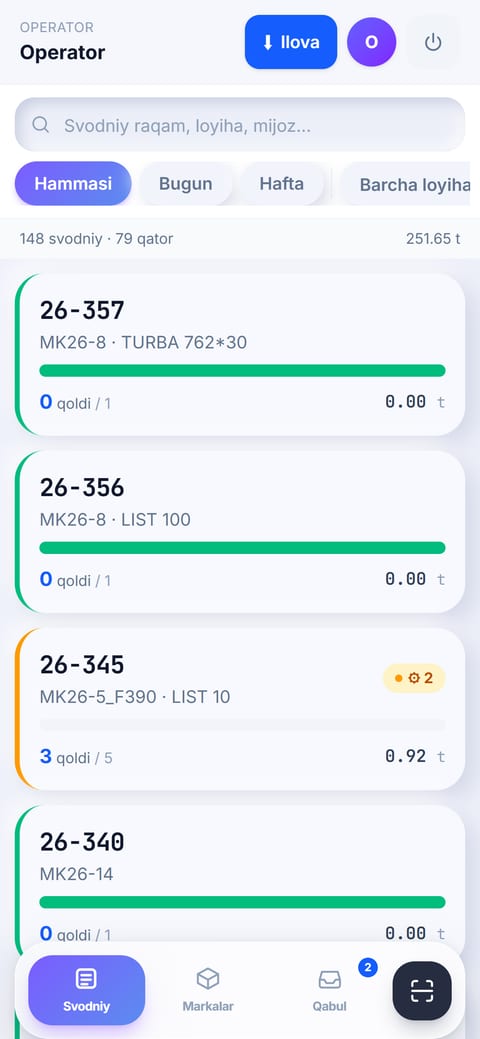
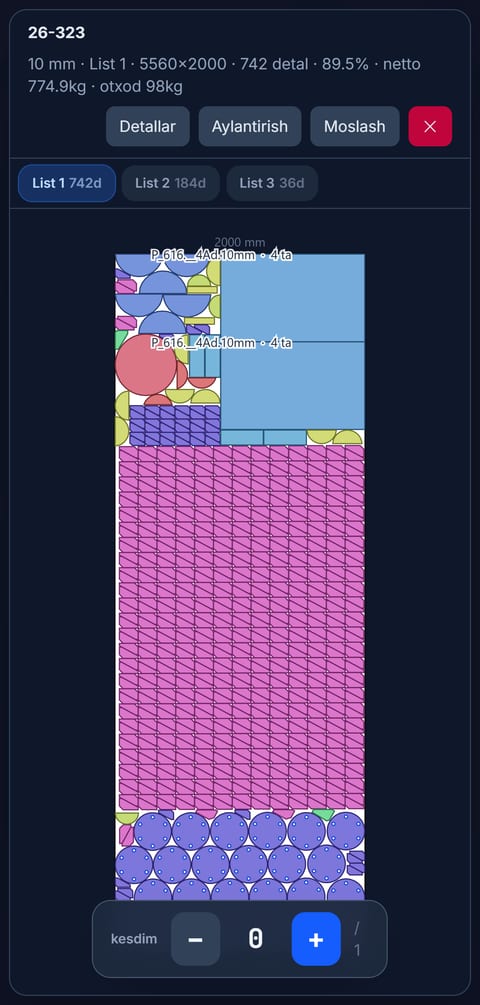
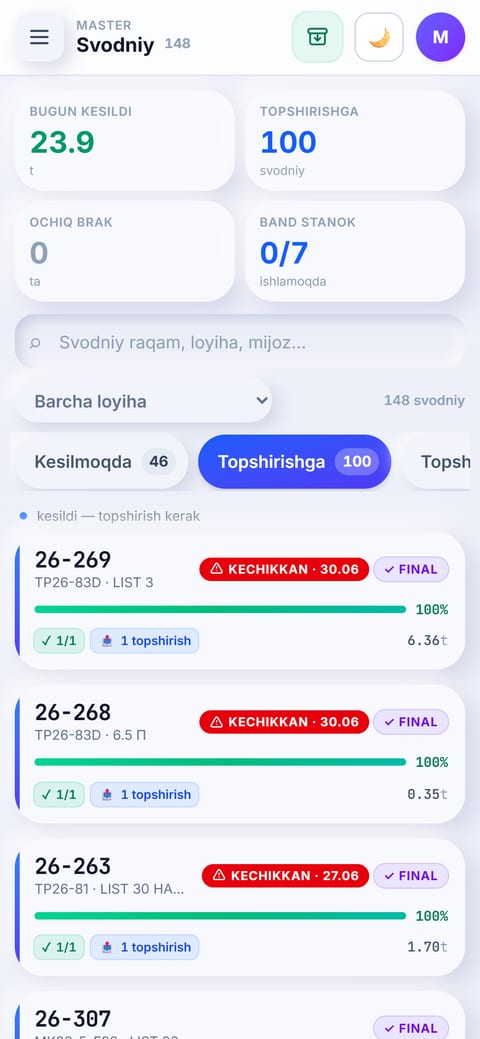
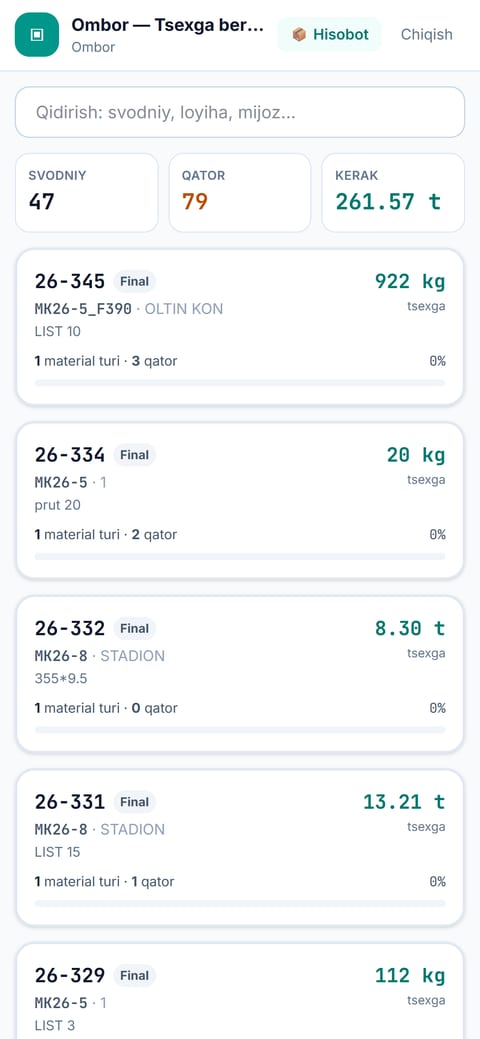
Workers use a phone, not paper
Operator, master, warehouse — each with their own screen. If the internet drops, nothing is lost.
Integrations
Works with the tools you already have
Features
The whole shop flow in one system
The sheet builds itself
Import from a Tekla BOM or Excel — rows, GOST weights and hierarchy are filled in. Every row keeps a gross / net / return balance with a revision history.
Three buttons on a phone
The operator taps Start / Done / Defect. The stage — queue, cutting, assembly, approval, paint, shipping — is visible to the whole plant as it happens.
Every kilogram traced
Material is reserved to a project, issued to the shop and returned as offcuts. Full receipt / issue / reservation ledger with an auditable balance.
Live machine load
Who is on which machine and what they are cutting. Utilisation, maintenance mode and a 14-day load trend.
Reports assemble themselves
Daily output, KPIs, scrap and machine load on a live dashboard and a wall kiosk. Every report exports to Excel or PDF.
Straight from the model
Marks, parts and weights come from Tekla Structures through a plugin. You review the diff — new / changed / removed — before applying it.
How it works
From order to shipment — 5 steps
More
Details that matter on the floor
Scrap analysis
See which profile wastes the most
QR scanning
Scan a mark with a phone
Wall kiosk
Live status on a big screen
Excel / PDF export
Every report, one click
PIN sign-in
Workers sign in with 4 digits
Real-time updates
Changes reach everyone in a second
Drawing archive
Files stay on your own server
Works like an app
Installs to the phone — PWA, offline warning
Revision history
Every version of the sheet is kept
30-day recycle bin
Deleted projects can be restored
Supply act (A4)
Material handover document, two copies
Project reconciliation
Compare plan, cut and assembled at close-out
Data health checks
Unlinked nesting, over-cut and stalled rows are flagged
Three languages
Uzbek, Russian, English — per employee
What's inside
What's inside
Built for a steel shop, not a generic ERP
We read your nesting — we do not generate it
Nesting is produced by your own software (CypNest and similar). Steel ERP reads the file, links each part to the material it was cut from, and shows the operator the cut map on the phone. No layout optimisation is claimed.
Nine production stages
Waiting → queue → cutting → assembled → approved → paint → delivery → installation. Every transition stores who, when and an optional photo.
Defect with a photo
The operator records a defect with a reason and photo; the master picks replacement material from returns or stock and sends it back for re-cutting.
Waybill for a real truck
Select marks and parts, enter the site, driver and vehicle — the trip is saved and an A4 waybill plus an Excel sheet are produced. Trips stay in history and can be reprinted.
Office watches, shop records
Managers and engineers see every shop screen read-only. Action buttons are hidden from them on purpose, so a record never says the wrong person did the work.
A screen per employee
Ready-made roles or page-level custom permissions. PIN sign-in for the floor, full audit log, strict company isolation.
Why not Excel
What broke in Excel — and how it works here
Five stages of the shop flow — manual in Excel, automatic in Steel ERP.
Jonli demo
Har bo‘limni jonli ko‘ring
O‘ngdagi lenta o‘zi aylanadi — kartaga sichqonchani olib boring, chapda tafsilot ochiladi. Bosing — haqiqiy interfeys (namuna ma‘lumot bilan, bazaga ulanmagan) ochiladi.
Dashboard
The whole plant on one screen — KPIs, live cutting, scrap.
Excel: Every report was assembled by hand.
Steel ERP: Updates itself, in real time.
Who it is for
Every role gets its own screen
The operator uses a phone, the director a dashboard. Everyone sees only what they need — sign-in is a 4-digit PIN.
Integration
Works with the tools you already have
Security
Your data stays yours
What this software does not do
It does not generate nesting layouts and does not claim to optimise material usage for you. Nesting comes from your existing software; Steel ERP reads it, links parts to material and keeps the record of what was actually cut.
FAQ
Straight answers
How long does rollout take?+
Usually a few days. You import a Tekla BOM or Excel, create users and assign roles. The shop can start recording the same week — the pace depends on how clean your BOM data is.
Will the workers manage?+
The operator screen has three buttons: Start, Done, Defect. Sign-in is a 4-digit PIN. Training takes about 15 minutes.
Does it do nesting?+
No. Nesting is done by your own software. Steel ERP reads the result, links each part to its material and shows the cut map to the operator.
Does it work without internet?+
The server runs on your own machine and the shop uses the local network. Remote access is optional.
How many users can I add?+
No limit. Operator, master, warehouse, engineer, planner, director — each with their own screen and permissions.
Do I need a mobile app?+
No. Open it in the browser and install it to the home screen — it behaves like an app (PWA).
Is my data safe?+
Each company is isolated, every action is in the audit log, and drawings stay on your machine.
Baholang & fikr bildiring
Fikringiz muhim
Botlarga qarshi — Google akkaunt bilan tasdiqlanadi. Faqat fikr uchun, tizimga kirmaydi.
Connect your shop
The demo is free, no commitment. If you have a question, write directly.